+91-9355000192
 Login

Click to WhatsApp Ads: 7 Strategies to Turn Ad Clicks Into Sales
- What Are Click to WhatsApp Ads?
- Why Click to WhatsApp Ads Are Uniquely Powerful
- 7 Best Practices to Boost Conversions With Click to WhatsApp Ads
- Conclusion
- FAQs
See the power of intelligent conversations for your brand.

People don’t shop the way they used to. They scroll, compare, and decide, often by chatting with a brand instead of browsing its website. And when it comes to conversions, convenience beats everything. That’s why click-to-WhatsApp ads have become a powerful tool for e-commerce and retail marketers who want to meet shoppers right where they are.
Yet many campaigns still underperform. Too many brands treat WhatsApp like a one-click lead capture and never build a full journey from ad to conversation to checkout. In this guide, we’ll walk through seven practical strategies that help performance marketers and retail growth teams turn WhatsApp ad clicks into real revenue.
What Are Click to WhatsApp Ads?
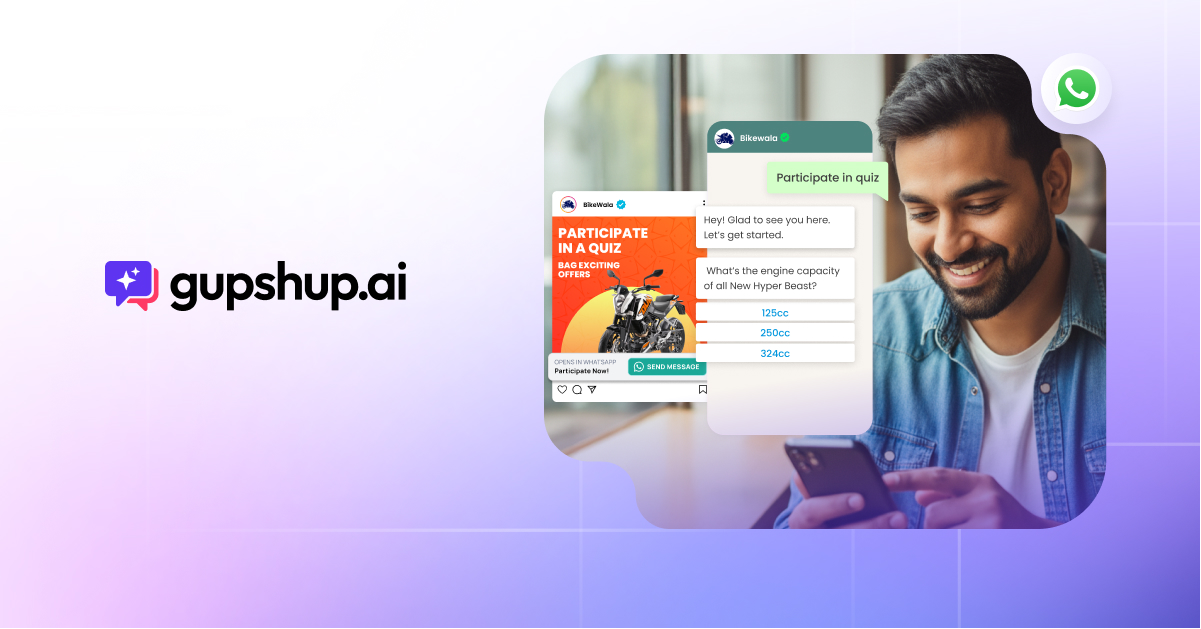
Click to WhatsApp ads (CTWA) are Meta ads on Facebook and Instagram with a call-to-action button, such as “Send Message” or “Chat on WhatsApp.” When a user taps the button, a WhatsApp conversation with the brand opens instantly, instead of a website or app. As a result, shoppers can ask questions, get recommendations, and buy without filling out forms.
Meta’s official documentation on ads that click to WhatsApp covers the technical setup, and our complete guide to click-to-WhatsApp ads explains the basics for marketers.
Why First-Party Data Makes Them So Valuable
Tracking users across the web keeps getting harder. Safari and Firefox already block third-party cookies by default, and although Google decided to keep third-party cookies in Chrome, privacy rules and user choices continue to limit cookie-based tracking. Consequently, brands need reliable ways to capture and re-engage their own audiences.
Click-to-WhatsApp ads solve this. Every chat starts with a real, opted-in conversation, so each click gives you a direct first-party connection instead of an anonymous pixel event.
Why Click to WhatsApp Ads Are Uniquely Powerful
Unlike conventional ads that leave you with a fleeting pixel, every click-to-WhatsApp interaction connects you with a real customer’s WhatsApp number. That one change turns a cold click into a reusable contact.
For example, at an illustrative click-through rate of 0.4%, 10,000 ad impressions would produce about 40 clicks. With standard ads, that’s 40 pixel events. With click-to-WhatsApp ads, however, that’s 40 real conversations you can continue later.
Traditional Ad Funnel vs Click-to-WhatsApp Funnel
| Strategy | Traditional ad funnel | Click-to-WhatsApp funnel |
|---|---|---|
| CTA | Click to website or app | Click to WhatsApp |
| Experience | Scroll and bounce risk | Real-time chat |
| Response time | Delayed or missed | Instant and interactive |
| Conversion path | Static forms and site navigation | Guided, dynamic conversation |
| Retargeting | Cookie-based | First-party chat data |
| ROI impact | Lower due to drop-offs | Higher through intent capture |
Instant conversations remove barriers. Customers don’t need to fill out long forms or wait days for a reply. Instead, they get fast, human-like help through an app they already trust.
Predictable Messaging Costs
WhatsApp follow-ups also keep costs steady. Unlike auction-based ad formats, WhatsApp messages follow Meta’s published per-message rates by country and message type. In addition, when a user starts a chat from a click-to-WhatsApp ad, and you reply within the customer service window, your messages can be free for a period that Meta says may last up to 7 days. So during busy seasons like Black Friday or year-end sales, you can keep re-engagement costs predictable while auction-based CPMs climb.
Success Story: NoBroker
NoBroker.com, a leading proptech platform, partnered with Gupshup to improve engagement across the home-seeker journey. It ran click-to-WhatsApp ads on social media to reactivate dormant users and attract fresh listings, and then guided each segment through tailored WhatsApp journeys. On top of that, an AI engine on Gupshup’s Conversation Cloud recommended properties based on each user’s preferences and budget.
According to the NoBroker case study, the brand saw 4X higher click-throughs, a 50% lower cost per activation, and 30% higher incremental reach via WhatsApp.
7 Best Practices to Boost Conversions With Click to WhatsApp Ads
WhatsApp is already where many customers expect post-purchase updates, such as order and delivery tracking. So click-to-WhatsApp ads aren’t just a fresh coat of paint on your usual campaigns. Instead, they require a new way to build, target, and nurture your funnel, because the conversation begins the moment a user taps your CTA. Whether that chat leads to a bounce or a buy depends on how well you manage the next few days.
1. Who Should You Target With Click to WhatsApp Ads?
The biggest mistake marketers make is treating all clicks the same. Someone discovering your brand for the first time doesn’t need the same message as a returning shopper two weeks after checkout.
The solution is to combine Meta audience filters with WhatsApp signals such as chat history, interest tags, and interaction frequency. This hybrid targeting turns WhatsApp into a conversion layer built around user intent.
| Audience type | Funnel stage | Ad format | WhatsApp trigger |
|---|---|---|---|
| Cold prospect | Top funnel | Video or carousel | “Learn More” opens a sample request |
| Warm lead | Mid-funnel | Product demo or testimonials | “Book Demo” starts a demo flow |
| Loyal buyer | Bottom funnel | Restock or offer ad | “Restock Now” enables a one-click rebuy |
For example, if you’re launching a new product, a cold audience may respond best to a sampling or “first look” flow. Meanwhile, past buyers can get personalized restock reminders or VIP-only bundles inside the chat.
How Gupshup Can Help
With Gupshup, you can combine real-time chat history and CRM data to segment and target users more precisely. Then, dynamic journey flows in Campaign Manager automate personalized messages for each audience segment, so every user gets the right message at the right time.
2. How to Optimize the First Click for Higher WhatsApp Engagement
Not every click will convert. However, you can raise your chances by making the first WhatsApp touchpoint as strong as possible, starting even before the user taps your ad.
When you create your click-to-WhatsApp ads:
- Lead with a clear offer: make the value obvious in the ad itself, for example, “Get 15% off your first order.”
- Set expectations upfront: tell users exactly what happens when they tap. Instead of a vague “Talk to us,” try “Chat with us to unlock your free trial.”
- Match urgency to intent: a first-time visitor may not be ready for “Buy Now,” so keep early messages helpful and engaging.
Once the user taps, reduce friction and keep the conversation moving:
- Pre-fill the first message with relevant context, such as the product or offer from the ad, using deep links.
- Use structured message templates with buttons and guided paths, so users move easily from discovery to selection to checkout.
How Gupshup Can Help
Gupshup supports deep linking and pre-filled messages, so the move from ad to chat feels smooth. Bot Studio lets you set up ready-made conversation flows that personalize the first reply. In addition, Campaign Manager tracks session attribution with UTM parameters, giving you clear insight into ad performance for sharper retargeting.
3. How AI Agents Improve Click-to-WhatsApp Conversations
Humans can’t manage thousands of chats at once, and the first few days after a click are critical. That’s where AI agents come in, adding scale and personalization.
AI agents do more than answer FAQs. They guide each conversation based on user intent and purchase history, leading customers to the next best action. For instance, if a user is browsing fitness supplements, the AI agent uses product logic and past browsing behavior to recommend the most relevant options.
Beyond recommendations, AI agents can also nudge users to add items to their cart, claim personalized discounts, or choose payment options like prepaid or cash on delivery.
The real advantage, though, is keeping the conversation warm. If a user drops off mid-chat, an AI agent can follow up while the free entry point window is still open, using reminders, price alerts, or stock notifications to rekindle interest.
How Gupshup Can Help
Gupshup’s AI agents and Commerce AI engine guide users through product selection based on past behavior and real-time interactions. Meanwhile, Bot Studio makes it easy to build personalized flows, and Campaign Manager automates follow-ups to reduce drop-offs and lift conversions. See how AI agents fix cart abandonment in e-commerce for more examples.
4. How to Personalize WhatsApp Ad Responses Using First-Party Data
A user who taps your ad has already raised their hand. But if every follow-up sounds the same, you waste that intent. Customers respond far better to experiences that feel personal and consistent across channels and languages.
Click-to-WhatsApp ads give you a golden opportunity here. Unlike static landing pages, WhatsApp chats can adapt to CRM data, such as:
- Past purchases: for example, “Would you like to reorder your Dry Skin Kit?”
- Language preference: load templates in each customer’s preferred language automatically.
- Location: share hyperlocal offers or the nearest store pickup details.
Behind the scenes, tight CRM integration and modular chat flows power this. Pre-built templates map to product categories, cart actions, or service types, which makes segmentation smarter and simpler.
How Gupshup Can Help
With Gupshup’s Customer360 and CRM integrations, you can use first-party data such as past purchases, language, and location to personalize every WhatsApp interaction. Bot Studio then lets you design flows that adapt to each user, and Campaign Manager delivers these personalized experiences at scale.
5. How to Recover Drop-Offs With Smart WhatsApp Retargeting
Even after a user clicks, chats, and shows intent, many still don’t complete the purchase. Drop-offs are inevitable. However, unlike typical funnels that rely on new ads or emails, WhatsApp gives you a direct line back to that user.
Here’s the key: the most effective retargeting doesn’t start with a new ad. Instead, it starts inside the same chat thread where the user left off. By referencing the user’s earlier session, you can send nudges that feel personal, not promotional.
These follow-up messages:
- Mention specific products or actions from the earlier session
- Use free-form replies within the 24-hour customer service window, and approved templates after it closes
- Usually perform better than cold retargeting through ads or email
As a result, you keep control of the customer journey, keep the experience conversational, and shorten the time to conversion.
How Gupshup Can Help
Gupshup automates re-engagement inside WhatsApp with Campaign Manager, so you can follow up on abandoned carts, wishlist activity, or product views without leaving the chat. Bot Studio lets you build smart nudges based on past behavior, while session data from Conversation Cloud keeps every follow-up relevant.
6. Can You Complete the Entire Purchase Journey Within WhatsApp?
Yes. Most e-commerce drop-offs happen at checkout. The moment a user has to switch apps, sign in, or wait for a slow page, conversion chances fall.
Click-to-WhatsApp ads flip this model by letting the whole purchase journey happen inside the conversation. Users can:
- Browse a product catalog in the chat
- Choose sizes, colors, and variants
- Add items to their cart
- Pay with UPI, cards, or cash on delivery through in-chat payments
- Share their delivery address
- Get live order tracking updates
This isn’t just a better experience. It also converts better, because the buyer stays in one trusted app from start to finish. Our post on WhatsApp commerce explores this in more detail.
Three things make it possible:
- Catalog syncing from platforms like Shopify or Magento
- Real-time inventory visibility
- Interactive chat flows that mirror a traditional checkout, but conversationally
When done right, this becomes more than an acquisition tactic. It becomes an owned, scalable commerce channel.
How Gupshup Can Help
Gupshup’s WhatsApp Business API enables rich commerce journeys with catalog browsing, cart actions, and address collection inside the chat. Its Commerce AI engine integrates with platforms like Shopify for real-time product discovery, variant selection, and one-tap checkout. With payment options like UPI, Razorpay, and Stripe, plus multilingual templates, brands can run full shopping journeys directly in WhatsApp.
Success Story: Arha Media
Arha Media, the company behind the Telugu and Tamil OTT platform Aha, partnered with Gupshup to boost engagement and subscriptions on WhatsApp. By connecting Gupshup’s WhatsApp Business API to its CRM, Arha sends 3 to 4 million personalized rich media messages every month.
According to the Arha Media case study, these messages achieve a 38% read rate. In addition, campaigns to recently churned users convert at 4 to 5%, in-chat payments lifted re-subscriptions by 10%, and nearly 10,000 users have paid through WhatsApp. Next, Arha plans to use click-to-WhatsApp ads to acquire new customers.
7. Which Metrics Matter Most for Measuring Click-to-WhatsApp Ad ROI?
Many brands track surface-level metrics like click-through rate or lead volume without linking them to revenue. Instead, focus on:
- Conversion rate per WhatsApp session
- Revenue per ad cohort
- Average cart value inside the chat
- Drop-off recovery rate
- Repeat purchases from retargeted contacts
Also, test and refine your ads, offers, and chat flows every few weeks, because small changes to the first message often make a big difference. Here’s a simple measurement matrix:
| Metric | Why it matters |
|---|---|
| Session-to-sale conversion | True ROI benchmark |
| Cart abandonment recovery | Shows retargeting effectiveness |
| Average order value in chat | Measures upsell success |
| Retarget click-to-conversion | Confirms that your messages resonate |
How Gupshup Can Help
Gupshup’s Campaign Manager and Unified Console give you full-funnel visibility, from ad click to conversation to conversion. You can track session-level performance, attribute revenue to specific cohorts, measure cart value in chat, and spot drop-off points. As a result, you can optimize campaigns in real time and improve ROI over time.
Conclusion
Click to WhatsApp ads give you a direct line to customer intent. However, they only work when they’re part of a complete, conversion-focused journey. From the first tap to the final sale, success depends on how well you manage targeting, chat flows, retargeting, and in-chat checkout.
Done right, they don’t just outperform traditional ads. They also redefine what performance looks like. Gupshup’s full-stack suite, from click-to-WhatsApp ad solutions to AI agents and multilingual commerce flows, helps you turn every click into revenue.
Ready to build a revenue engine inside WhatsApp, one conversation at a time? Talk to our experts today.
FAQs
How do click to WhatsApp ads work?
You create a Facebook or Instagram ad in Meta Ads Manager and choose WhatsApp as the message destination. When a user taps the ad’s button, WhatsApp opens with a chat to your business, often with a pre-filled message. Your team, chatbot, or AI agent then replies to answer questions and guide the user to a purchase.
Can I run click-to-WhatsApp ads without a website?
Yes. You only need a Facebook Page or Instagram account, a WhatsApp Business account, and a Meta ad account. You don’t need a website to start conversations or make sales because you can share catalogs and take payments in chat.
How much do click to WhatsApp ads cost?
You pay for the ad itself through Meta’s normal ad auction, based on your budget and bidding. When a user starts a chat from the ad on mobile and you reply within the customer service window, Meta does not charge for your messages during the free entry point window, which can last up to 7 days.
How long can I message a user after they click my ad?
You can send free-form replies within 24 hours of the user’s last message, which is WhatsApp’s customer service window. After that, you need an approved template message. For chats that start from click-to-WhatsApp ads, your messages can also be free during the free entry point window.
Are click to WhatsApp ads effective for high-ticket items?
Yes. They enable consultative selling, which matters for expensive purchases where buyers need more information and confidence. A chat lets you answer detailed questions, share brochures or videos, and book demos or store visits.
Do click to WhatsApp ads support images, videos, and catalogs?
Yes. Once the chat starts, you can send images, videos, documents, interactive buttons, and product catalogs to enrich the buying experience inside the conversation.

A marketer who loves turning complex tech into simple stories that customers connect with. He enjoy building go-to-market strategies, scale customer acquisition, and explore how AI can reshape marketing and customer engagement.
Read: Gupshup’s Secret Sauce: Why Gupshup Earned the Title of Best Conversational & Voice AI Company